Investors: Privacy Focused Multiasset Portfolio Tracking in 20 Minutes
Compare self hosted, client side, and privacy minded SaaS for multiasset portfolios. See which encryption and sync controls matter, then test Evibe with a...
Investors: Privacy Focused Multiasset Portfolio Tracking in 20 Minutes

For most privacy-conscious investors who want multi-asset coverage without handing over raw financial data to a third party, the answer is a tracker that encrypts your data at rest, minimizes telemetry, and gives you full export and deletion control. Evibe fits that category, alongside open-source self-hosted tools for readers who want full sovereignty. Check the security section during your trial, then decide.
TL;DR:
- Self-hosted tools provide complete control over data but require time and technical skill to set up and maintain.
- Browser-based trackers use client-side encryption, reducing remote server risk but increasing device-compromise vulnerability.
- Verified encryption standards, zero telemetry options, and open-source code are essential for trustworthy privacy claims in portfolio trackers.
- Manual CSV import offers maximum privacy for small portfolios, while automated syncing benefits multi-device users willing to accept third-party exposure.
- Evibe offers automatic syncing, user-controlled data deletion, and encryption, making it suitable for those seeking convenience with privacy safeguards.
Table of Contents
- Self-Hosted, Client-Side, or Privacy-Minded SaaS: Which Fits You?
- What to Check Before Trusting Any Privacy Claim
- How Do You Import Data Without Leaking Credentials?
- Backups, Sync, and Recovery: Your Ongoing Privacy Routine
- Where Evibe Lands on This Checklist
- How Long Does Setup Actually Take?
- What Does This Actually Cost You Over Time?
- Choosing Between Convenience and Full Self-Sovereignty
- Try Evibe for Multi-Asset Privacy Without the Setup Work
- Resources to Verify Privacy Claims Yourself
- Sources
- FAQ
Self-Hosted, Client-Side, or Privacy-Minded SaaS: Which Fits You?
Three architectures dominate privacy-focused portfolio tracking, and they solve different problems for different people.
Self-hosted tools run on your own hardware, usually through a Docker container you control. Projects in this category store your data in a local database with no vendor server involved. You get live valuations pulled from public price feeds, multi-broker syncing configured by hand, and complete control over backups. The trade-off is maintenance: you're responsible for updates, uptime, and disaster recovery.
Client-side or browser-based trackers take a different route. A tool like MAERMIN runs entirely in your browser, storing data in local storage behind an encrypted vault secured with AES-256-GCM and a key derivation function such as PBKDF2 with 600,000 iterations or Argon2id. Nothing touches a remote server unless you explicitly export a backup. That shifts the risk profile: your biggest exposure becomes device compromise, not a server breach.
Privacy-minded SaaS platforms sync accounts automatically while limiting what they retain and how they use it. This is the most convenient tier, and it suits people juggling stocks, crypto, real estate, and private equity across multiple devices who don't want to run infrastructure themselves.
Here's how the trade-offs break down by user profile:
- New to investing, single device: privacy-minded SaaS gets you running in minutes with no setup friction.
- Technically comfortable, wants full control: self-hosted, local-database tools like rotki or Docker-based options give you complete data sovereignty.
- Multi-device household, values both convenience and privacy: a SaaS platform with strong encryption and no third-party data sales, checked carefully against the criteria below, tends to be the practical middle ground.
What to Check Before Trusting Any Privacy Claim
"Privacy-focused" is a marketing phrase until a product backs it with specifics. Verify these six items in order, because they build on each other. A tool that fails the first two rarely delivers on the rest.
- Encryption at rest and encrypted backups. Look for named standards, not vague reassurance. AES-256-GCM paired with a strong key derivation function like Argon2id or PBKDF2 at a high iteration count is the current baseline; a vendor that won't name their algorithm is telling you something.
- No unnecessary telemetry. The product should either send zero behavioral data home or give you a visible, working toggle to turn it off. If you can't find the setting, assume it's collecting by default.
- Zero-knowledge or client-side encryption for sync. When your data leaves your device, it should leave as ciphertext the vendor can't read. A zero-knowledge relay design typically stores only an encrypted blob plus device key metadata in the cloud, meaning even a server breach exposes nothing readable.
- Export and deletion that actually work. Test this before you commit to a service, not after. A password-protected export you can open in a spreadsheet is a good sign; a support ticket required to delete your account is a bad one.
- Authentication that resists shortcuts. Passkey or WebAuthn support plus an idle auto-lock timer matter more than a long password policy.
- Open-source code or documented security practices. Projects that publish their cryptographic choices in a public README, the way ghostfolio does, let you or a security researcher verify the claims instead of taking them on faith.
Pro Tip: A vendor that says "bank-level encryption" without naming an algorithm or iteration count is giving you marketing copy, not a security spec. Ask for the parameters directly, or check the documentation yourself.
How Do You Import Data Without Leaking Credentials?
Getting your accounts into a tracker is where privacy leaks most often happen, usually because the fastest method is also the least private one.
CSV or manual import is the safest option by a wide margin, since nothing ever touches a third-party server. It's slower, and it means re-uploading files whenever your holdings change, but for a handful of accounts it's worth the friction.
Browser-based portal capture keeps your brokerage login local to your device. The tool automates the login process in your browser rather than storing your password on a remote server, which limits exposure without requiring manual data entry.
Aggregator APIs, the connection method behind most automatic account syncing, offer real convenience: your accounts refresh without you touching a keyboard. The privacy trade-off is that a third party sits between you and your brokerage. Look for providers that state they don't sell your data and that support credential rotation if a breach ever happens.
Zero-knowledge relay patterns, sometimes built on edge infrastructure like Cloudflare Workers, route data through a relay that never stores your raw credentials, only encrypted session tokens.
For any import session, a few habits matter regardless of method:
- Use a private or incognito browser window when connecting a new account.
- Avoid public Wi-Fi during the initial sync.
- Take a manual backup immediately after your first successful import.
Backups, Sync, and Recovery: Your Ongoing Privacy Routine
Setup is the easy part. Staying private over months and years takes a repeatable routine.
Encrypted backups need testing, not just creating. Export a backup, then actually restore it to a spare device or a fresh install to confirm the password and file format work before you need them in an emergency.
Multi-device sync deserves scrutiny too. Check whether the app maintains a device trust list you can view and revoke from, and whether sync uses session keys tied to each device rather than one shared credential across all of them.
If a device is lost or compromised, act in this order:
- Revoke that device's session or key from your account settings immediately.
- Rotate the master password and any linked brokerage credentials.
- Restore your portfolio data from the most recent encrypted backup on a clean device.
Pro Tip: Pair your tracker with a dedicated password manager and full-disk encryption on every device you use for finances. A privacy-first app can't protect you if the device underneath it isn't locked down. A privacy mode that masks your net worth on screen, a feature increasingly common across these tools, is worth enabling by default if you ever screen-share or work in public.
Where Evibe Lands on This Checklist
Evibe consolidates stocks, ETFs, options, crypto, real estate, and other holdings into one dashboard, with automatic syncing and AI-driven analysis of risk and diversification layered on top. Evibe's own product materials state that it never sees your login passwords, stores account data in anonymized form, and follows GDPR-aligned deletion practices, with no ads and no data sales built into the business model.
During a trial, verify these directly rather than taking the claims at face value:
- Whether encrypted backup export is available and produces a file you can actually restore.
- What authentication options exist, including passkey or biometric unlock.
- Whether there's a telemetry toggle, and what it says it turns off.
- Whether account deletion is self-service or requires a support request.
If those checks hold up, Evibe covers the automatic-sync convenience tier without the manual CSV grind that self-hosted tools require.
How Long Does Setup Actually Take?
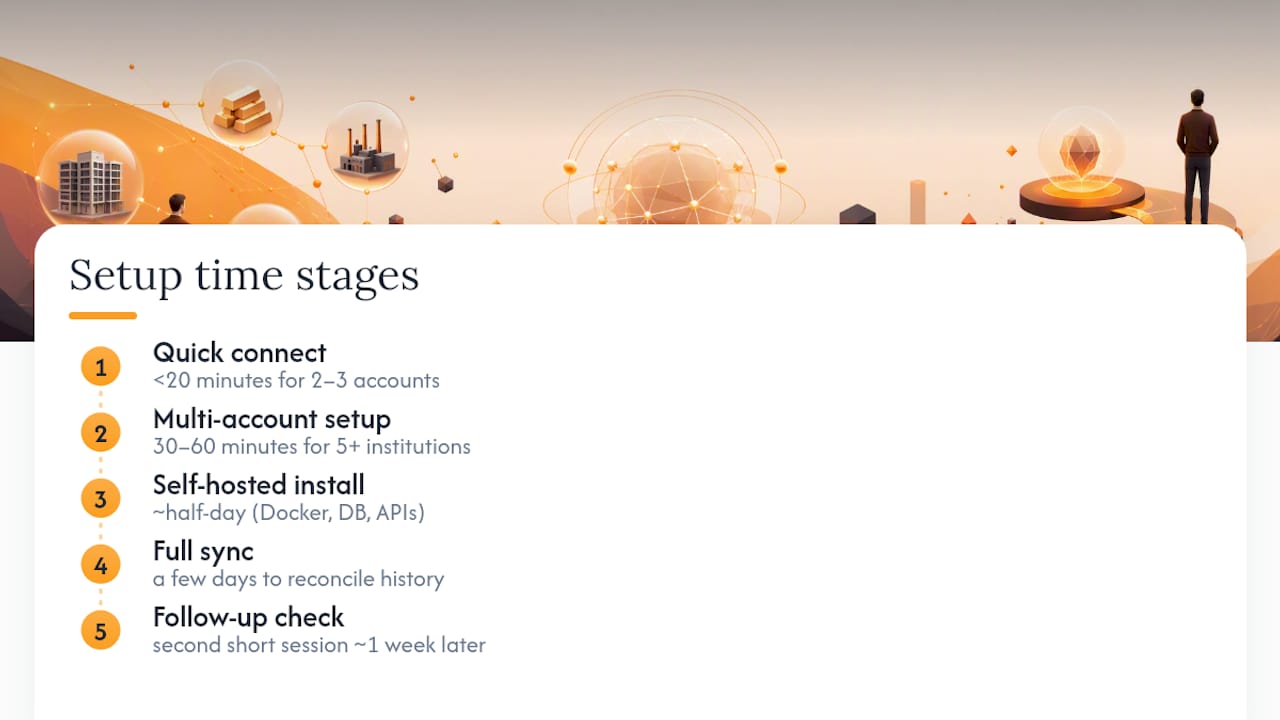
Connecting your first two or three accounts to a privacy-focused tracker usually takes under 20 minutes, whether you're using a SaaS app with automatic syncing or manually uploading a CSV. The real timeline stretches out from there.
A portfolio spanning five or more institutions, including brokerages, crypto exchanges, and a manually entered real estate holding, typically takes a first sitting of 30 to 60 minutes to fully connect and categorize. Automatic syncing tools shorten this because each linked account pulls in transaction history automatically rather than requiring you to reconstruct cost basis by hand, often using an embeddable real-time market-data widget to provide live valuations.
Self-hosted setup runs longer. Installing a Docker container, configuring a local database, and connecting price feed APIs for live valuations is realistically a half-day project for someone comfortable with a command line, and longer for someone who isn't. That upfront cost buys you full control over where your data lives.
Full sync, meaning every historical transaction, dividend, and cost-basis figure reconciled correctly, often takes a few days regardless of platform, since brokerage APIs sometimes lag in posting recent trades and dividend payments need a settlement cycle to appear. Expect to spend a second short session about a week after initial setup double-checking balances against your actual brokerage statements before you trust the numbers for tax or planning decisions.
What Does This Actually Cost You Over Time?
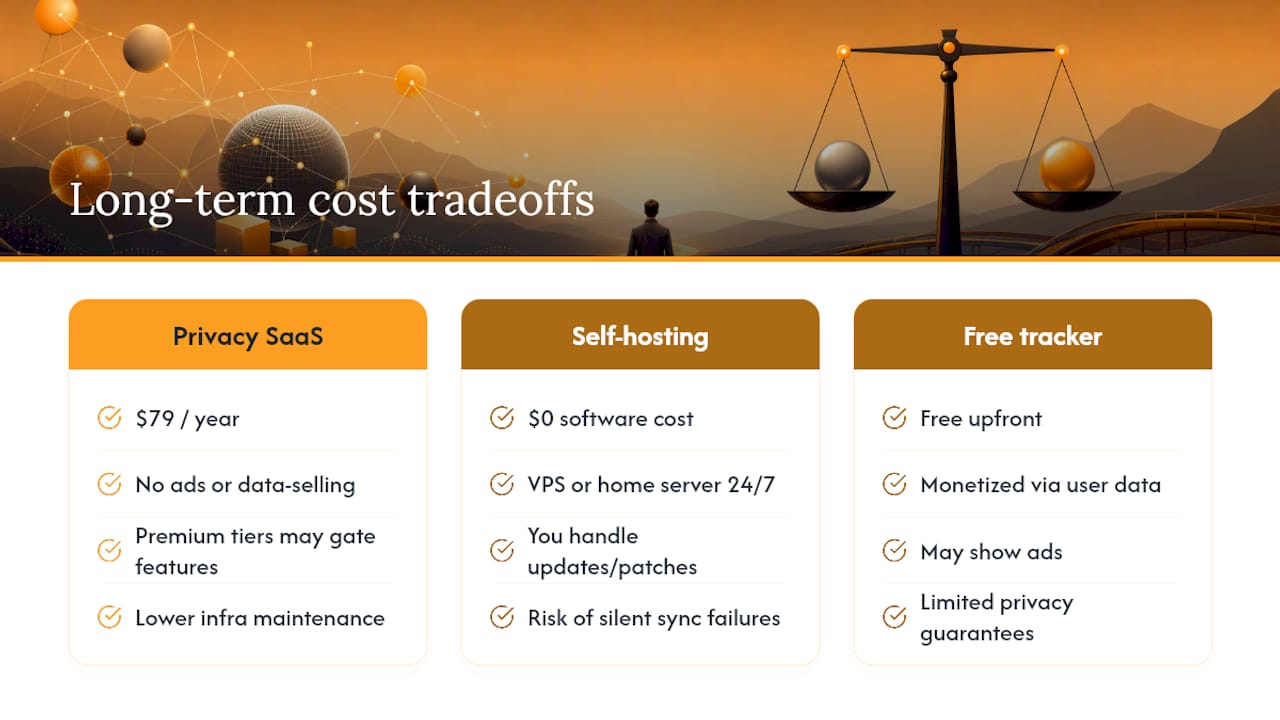
The subscription price on the page rarely tells the whole story. Evibe is priced at $79 per year, a flat annual fee with no ads and no data-selling revenue model, which matters because a free tracker has to make money somehow, and that somehow is often your data.
Self-hosting looks free at first glance since the software itself typically costs nothing. The real costs show up elsewhere: a virtual private server or home server running 24/7 for continuous syncing, your own time spent on updates and security patches, and the risk cost of being your own IT department if something breaks during a market swing when you need accurate numbers fast.
Privacy-minded SaaS platforms sometimes gate real features behind premium tiers, things like options tracking with Greeks, multi-currency support with historical FX rates, or API access for connecting to AI assistants. Read the pricing page closely before assuming the advertised rate covers everything you'll actually use.
The honest total cost of ownership comparison isn't subscription price versus zero. It's subscription price versus your own hourly value spent maintaining infrastructure, plus the very real risk that a self-managed setup fails quietly and you discover a sync gap months later.
Choosing Between Convenience and Full Self-Sovereignty
If you're technically comfortable and hold a modest number of accounts, self-hosting a tool that keeps everything on local storage gives you the strongest privacy guarantee available. If you hold complex, multi-asset positions across many institutions, accept managed sync from a provider that documents its encryption and that refuses to sell your data. Evibe's checklist alignment makes it a reasonable starting point either way.
— Vincent
Try Evibe for Multi-Asset Privacy Without the Setup Work
Evibe gives you the multi-asset coverage self-hosted tools promise, stocks, ETFs, options, crypto, real estate, and more, without the Docker container, the server maintenance, or the weekend spent configuring a database. Accounts sync automatically, the company states it never sees your passwords and stores data anonymized, and there are no ads or data sales funding the product.
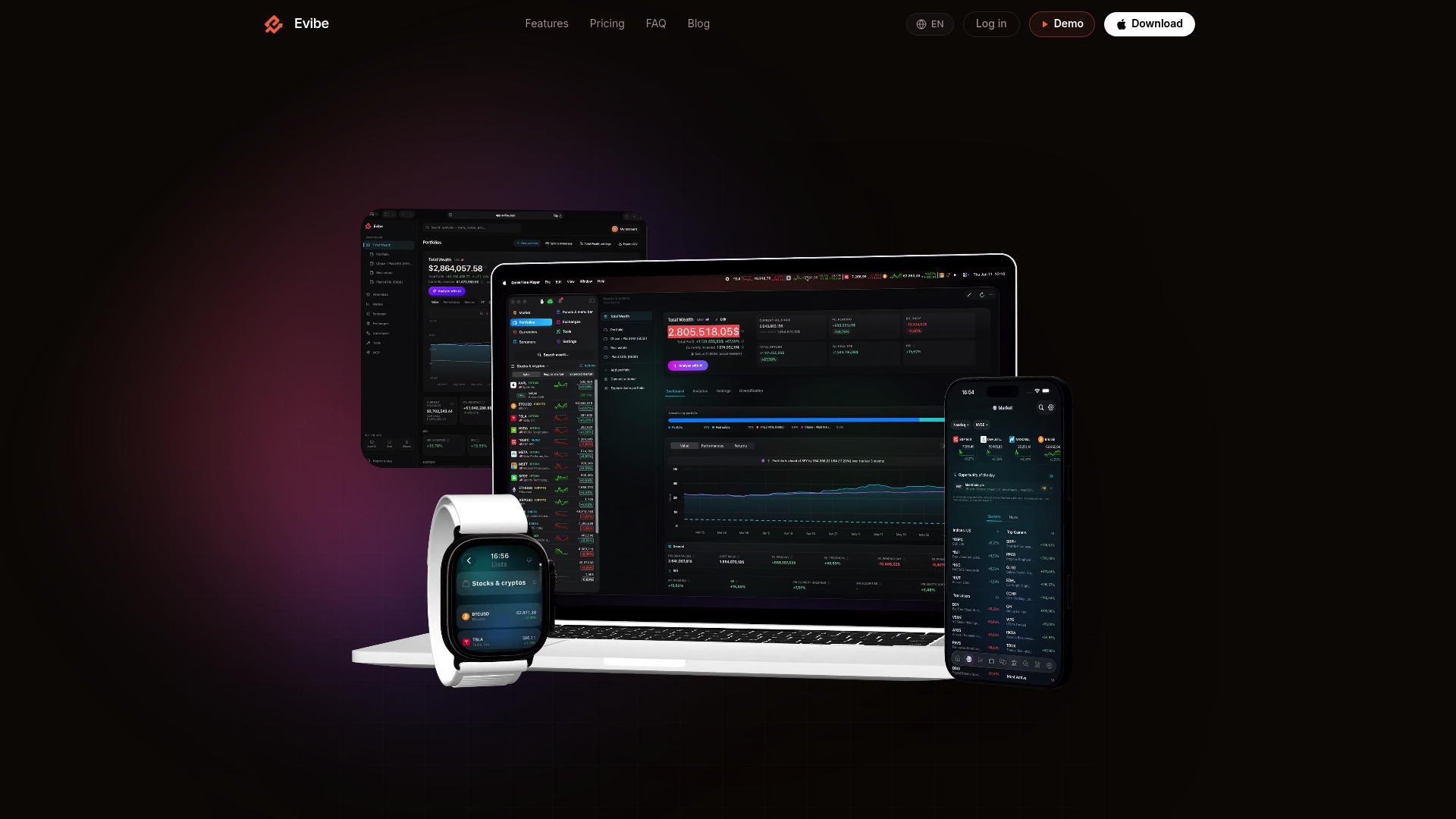
A 7-day free trial through the Evibe app lets you test the checklist yourself: connect two or three accounts, check the backup export, look for the telemetry toggle, and confirm deletion actually works before your trial ends. If your portfolio includes options positions, the dedicated stock tracking tools show Greeks and expiry calendars alongside your other holdings in the same dashboard. The app is offered for a flat annual fee; check the official site for current pricing and details about trials and subscriptions.
Resources to Verify Privacy Claims Yourself
For readers who want to inspect the code directly: MAERMIN demonstrates client-side AES-256-GCM encryption in a browser-based vault. rotki shows a self-hosted, local-storage approach with published analytics code. Both READMEs document their exact encryption parameters, which is the standard every privacy claim should be measured against.
This article is general information, not a substitute for advice from a qualified financial advisor. Consult a qualified financial professional about your own circumstances before acting on anything here.
FAQ
What Is the Best Privacy-Focused Portfolio Tracker?
There's no single universal answer, since "best" depends on whether you want full self-hosted control or managed convenience with strong encryption. For most multi-asset investors who want automatic syncing without maintaining a server, a tool like Evibe that documents anonymized storage and skips data sales is a solid starting point; technically inclined users may prefer self-hosted options like rotki.
What Is the 7-5-3-1 Rule in Investing?
The 7-5-3-1 rule is an informal guideline some investors use for equity allocation horizons, but definitions vary widely across sources, and there's no single authoritative version. Treat any specific numbers attached to it with caution and verify against a financial professional before applying it to your own allocation.
What Is the Best Website or App for Tracking a Portfolio?
The best choice depends on whether you prioritize privacy, automation, or asset breadth. Apps that consolidate stocks, crypto, real estate, and other holdings with automatic syncing, like Evibe, suit investors who want one dashboard without manual entry, while self-hosted web tools suit those who want data to never leave their own hardware.
Is Automatic Account Syncing Safe for Privacy?
Automatic syncing through an aggregator API is safer when the provider states it doesn't sell data and supports credential rotation after a breach. It carries more exposure than manual CSV import by design, since a third party sits in the connection path, but strong encryption and clear no-telemetry policies mitigate most of that risk.
How Much Does Evibe Cost?
Evibe costs $79 per year, billed annually with a 7-day free trial to test the app before committing. There's no free tier and no ad-supported version, which aligns with its stated no-data-selling model.