Your portfolio, glanceable on your wrist
Evibe ships a real Apple Watch companion app, with complications on every watch face and Smart Stack entries for the surfaces where it matters. The job is glanceable, not deep — your wrist is for "is anything important happening right now", not for building a screener.
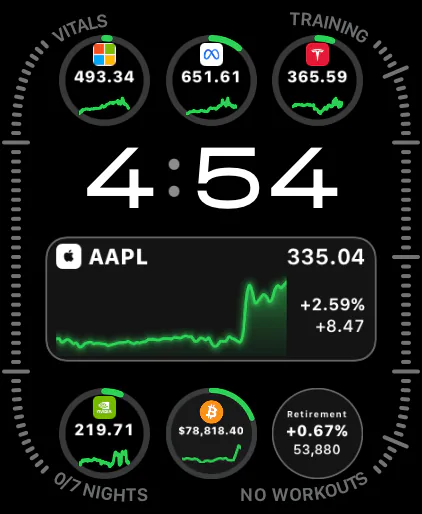
Complications on every face
Whatever watch face you live on, Evibe has a complication that fits it.
- Circular slots — net worth, single ticker, today's portfolio %.
- Rectangular / bezel slots — net worth + intraday % delta in one tile.
- Modular Ultra extra-large — a compact portfolio dashboard: net worth, top movers, today's % change.
- Infograph radial slots — a small radial chart of your top allocations.
Each complication can be configured: which symbol, which portfolio, and color.
Smart Stack
The Smart Stack on watchOS surfaces the right widget at the right moment. Evibe contributes two:
- Market open — first hour after your local market opens, shows the day's top movers in your portfolio.
- Alert just fired — when one of your price or earnings alerts triggers.
These are surfaced by the OS based on time and context, so the most relevant Evibe glance is in front of you without you needing to scroll.
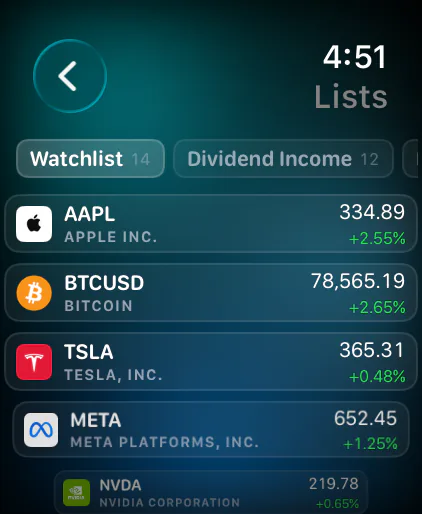
Tap-through experience
Tap any complication or Smart Stack tile and the Watch app opens with the relevant detail view — the full ticker, the alert that fired. The app is intentionally minimal: one screen per concept, big readable numbers, no nested navigation.
Real-time on the wrist
When the streaming engine receives a tick on a symbol you have a Watch complication for, the complication updates within the OS's allowed cadence (watchOS rate-limits complication refreshes to preserve battery, so "real-time" here means seconds, not milliseconds). For price alerts, push notifications arrive instantly.
No iPhone required for read
The Watch app pulls its data live from Evibe's API in real time — not from a local cache or iCloud sync — so it works on a cellular Apple Watch without your iPhone nearby. Adding a new position or changing a portfolio still requires the phone or Mac.