Traders: Track Options Positions in 10 Minutes With One Weekly Review
Practical workflow for options traders: import broker history, reconcile P&L, set alerts, and run a 10-minute weekly review to avoid surprise assignments.
Traders: Track Options Positions in 10 Minutes With One Weekly Review

Track each open and closed option as a trade row with core fields like strike, expiry, and premium, then layer on automated imports, expiry alerts, and a weekly review. That's the whole workflow. Start by importing your last 90 days of broker history or turning on account sync today, and aim for a reconciled P&L that matches your broker to the dollar, with zero surprise assignments.
TL;DR:
- Tracking each option trade requires detailed data, including entry and exit prices, Greeks at entry, and assignment flags to accurately analyze performance.
- Using spreadsheets is suitable for fewer than 10 positions but becomes cumbersome with larger, multi-broker portfolios, where dedicated apps are more efficient.
- Monitoring assignment risk and expiration clustering helps prevent margin calls by assessing capital needs if multiple positions are assigned simultaneously.
- Weekly reviews should focus on P&L, position clustering, and actionable lessons, taking less than ten minutes if the system is set up correctly from the start.
- An effective options tracker automates imports, Greeks, alerts, and trade tagging, with Evibe offering a comprehensive solution that consolidates multiple asset types.
Table of Contents
- What to Record in an Options Tracker
- Tools and Workflows for Tracking Options
- How Do You Track Assignment and Expiration Risk?
- Setting Up Your Tracker and Weekly Review
- What Traders Who Level Up Actually Do Differently
- Evibe Maps Directly to This Workflow
- Sources
- FAQ
What to Record in an Options Tracker
A spreadsheet with three columns tells you nothing useful after 20 trades. A proper options tracker needs enough structure to answer two questions later: what worked, and what almost blew up your account.
TraderSync's research on trade journaling lays out the baseline: entry price, exit price, entry date, exit date, call or put, position size, strike, and expiry. That's the floor, not the ceiling. Miss any one of those and you can't reconstruct a trade six months later when you're trying to figure out why your credit spreads underperformed your iron condors.
Here's the fuller field list worth building into any tracker, whether it's a spreadsheet or an app:
- Identity fields: ticker, call or put, strike, expiry date, number of contracts, buy or sell
- Entry data: entry price, entry date and time, commission paid, opening Greeks snapshot (delta, theta, IV)
- Risk markers: break-even price, max loss, assigned flag (yes/no)
- Exit data: exit price, exit date, exit reason (profit target, stop, expiration, assignment)
- Outcome: realized P&L net of fees, any adjustments made mid-trade
- Context tags: strategy name, setup type, management rule used, lesson learned
That last category, the meta tags, is where most traders skip corners and where the real analytical value hides. A "credit spread" tag tells you nothing.
The opening Greeks snapshot deserves special attention because it's the field traders forget most. Without a delta and theta reading at entry, you can't tell whether a losing trade lost because the market moved against your thesis or because you sized a position with far more directional exposure than you intended. Recording it once, at entry, costs seconds. Reconstructing it later is often impossible.
The assigned flag matters just as much. A closed position that expired worthless behaves completely differently in your analytics than one that got assigned and turned into 100 shares of stock. Lump them together and your win rate, your average holding period, and your capital-at-risk numbers all quietly go wrong. Every dedicated options tracker worth using treats assignment as a distinct state, not a footnote.
Tools and Workflows for Tracking Options
The right tool depends almost entirely on how many positions you're running and whether you trade across more than one broker. Three tiers cover almost every trader.
- Spreadsheets. Google Sheets or Excel work fine below roughly a small number of active contracts. Build one tab for open positions and one for closed trades, link them with a status column, and use
SUMIFSto roll up P&L by strategy tag. The catch: spreadsheet-based journals struggle with corporate actions like stock splits, mergers, or special dividends, which quietly break strike and share-count math unless you manually adjust every affected row. - Broker-native tools. Most brokerages show open positions and basic P&L inside their own platform. They're fine for a single-account snapshot, but they don't merge data across two brokers, don't track historical Greeks trends, and rarely let you tag trades by strategy for later analysis.
- Dedicated tracking apps. App store listings show a growing category of mobile-first options trackers built specifically around auto-imports, live Greeks, multi-leg grouping, and assignment handling. Heavier traders gravitate here because the app does the reconciliation work a spreadsheet forces you to do by hand.
Some full-featured platforms go further, combining live option chains, P&L dashboards, and expiry calendars into one workspace so you're not toggling between four browser tabs during earnings week.
Pro Tip: Run a quick capacity test before committing to a tool. Count your current open positions. Under 10, a spreadsheet is genuinely fine. Between 10 and 25, you're in the gray zone where a dedicated app starts paying for itself in saved reconciliation time. Above 25, manual tracking becomes a liability, not a discipline.
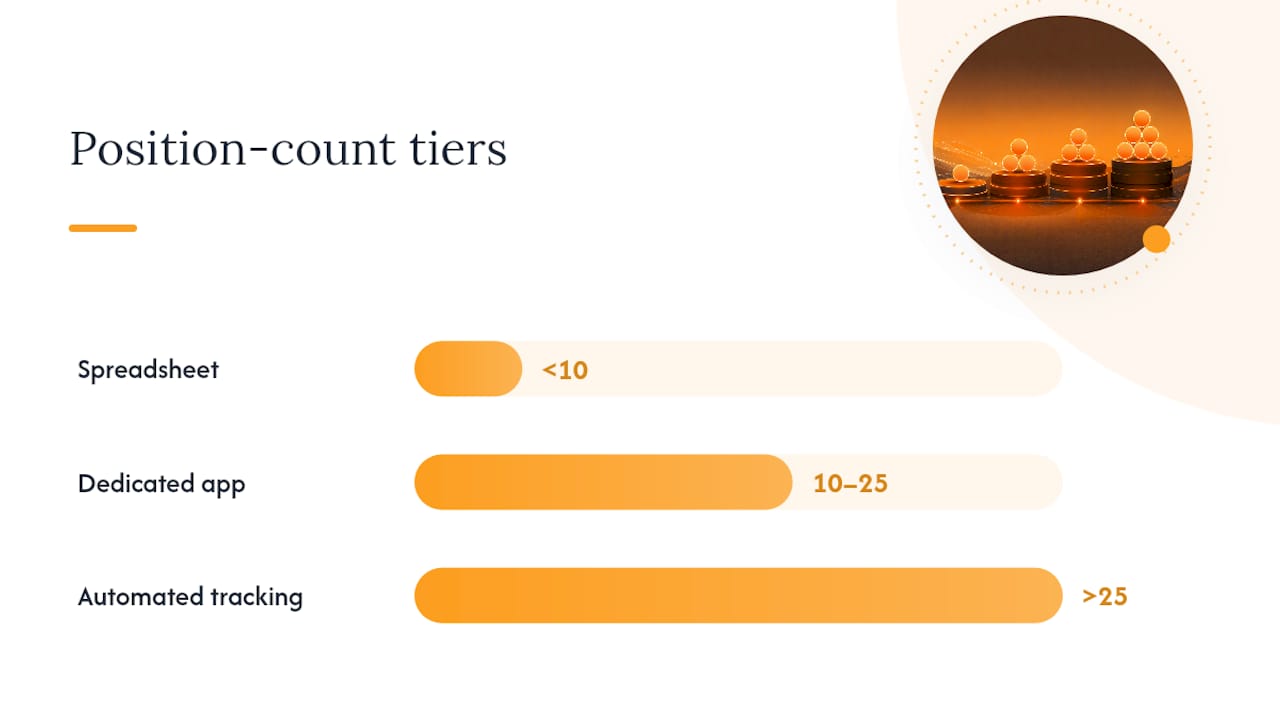
Your decision really comes down to four questions: how many positions are you juggling right now, do you trade across multiple accounts or brokers, do you want alerts pushed to your phone instead of checking a browser tab, and are you willing to pay a monthly fee for the time it saves. Answer those honestly and the right tier picks itself.
How Do You Track Assignment and Expiration Risk?
Assignment risk doesn't spread itself evenly across the calendar. It clusters, and clusters are where accounts get into trouble.
Expiration clustering happens when you've sold multiple contracts that land on the same weekly or monthly date, often without realizing it because you opened them on different days for different reasons. A structured assignment-tracking framework recommends scanning your book specifically for these overlaps, since a handful of near-simultaneous assignments can demand far more capital than any single position implied on its own.
Multiple near-simultaneous assignments are a common source of surprise capital risk in an options book, more than any single bad trade.
Moneyness drives assignment probability in a predictable pattern. Deep in-the-money short options carry high assignment odds, especially close to expiry. Near-the-money contracts are the hardest to call and deserve the closest daily attention. Out-of-the-money short options rarely get assigned early, but never assume "rarely" means "never," particularly around ex-dividend dates, when early assignment risk on short calls spikes as holders try to capture the dividend.
To size your simultaneous assignment risk, add up the capital required if every short position currently in the money got assigned on the same day. If that number would strain your buying power, you have three real options: close the position early, roll it to a later expiry, or accept the assignment and plan the resulting stock position deliberately. Waiting until assignment morning to figure this out is how margin calls happen.
A workable monitoring cadence, drawn from the same assignment-tracking guidance, breaks into three tiers:
- Daily: scan for any short position now deep in-the-money with days-to-expiry in single digits.
- Weekly: run a full 7-day lookahead across every open position, not just the ones flagging red.
- Monthly: compare your assignment predictions against what actually happened, and adjust your moneyness thresholds if you're consistently surprised.
Setting Up Your Tracker and Weekly Review
Building the system takes an afternoon. Running it well takes ten minutes a week, forever, if you set it up right the first time.
- Import your history. Pull broker exports covering at least a recent period covering several months, or turn on account sync if your platform supports it. Automated imports that preserve fill timestamps and contract-level detail cut reconciliation errors dramatically compared to retyping trades from memory.
- Build the canonical trade-row template. Use the field list from earlier in this piece as your column headers, and don't skip the meta tags. Every trade gets a strategy label and a setup type from day one, not retroactively.
- Reconcile against your broker statement. Before trusting the tracker for analysis, match its running P&L to your broker's stated balance for the same period. Any mismatch usually traces back to a missed adjustment, a corporate action, or a fee that wasn't logged.
- Handle special cases explicitly. Stock splits change strike and contract multipliers. Assignments convert an option row into a stock position that needs its own cost-basis tracking. Mark both immediately, not "later this week."
- Turn on automated alerts. Set notifications for approaching expirations, elevated assignment probability, sudden Greeks shifts on open positions, and upcoming ex-dividend dates on anything with short calls.
- Run the weekly review. Filter your book by strategy and days-to-expiry, calculate P&L and win rate for each strategy bucket, and write down one lesson and one action item for the coming week.
Pro Tip: Keep the weekly review to three questions: What's my P&L by strategy this week? Which positions cluster in the next seven days? What's one rule I'll change next week based on what just happened? Answering all three takes less time than reading this section did.
What Traders Who Level Up Actually Do Differently
The traders whose results actually improve year over year log intention, not just outcome. They write down why they entered a trade and how they planned to manage it, which separates good process from lucky timing when a trade wins for the wrong reason.
They also tag consistently. A "45 DTE credit spread" and a "7 DTE credit spread" are different trades wearing the same costume, and lumping them under one tag destroys the comparison you were trying to make. The traders who skip this step usually blame the strategy when the real problem is the data.
The mistakes that keep showing up: ignoring commissions on high-frequency small-premium trades, forgetting to mark assignments as a distinct outcome, and letting expirations cluster on the calendar until margin calls make it someone else's decision. None of that requires talent to avoid. It requires a system you actually check.
— Vincent
Evibe Maps Directly to This Workflow
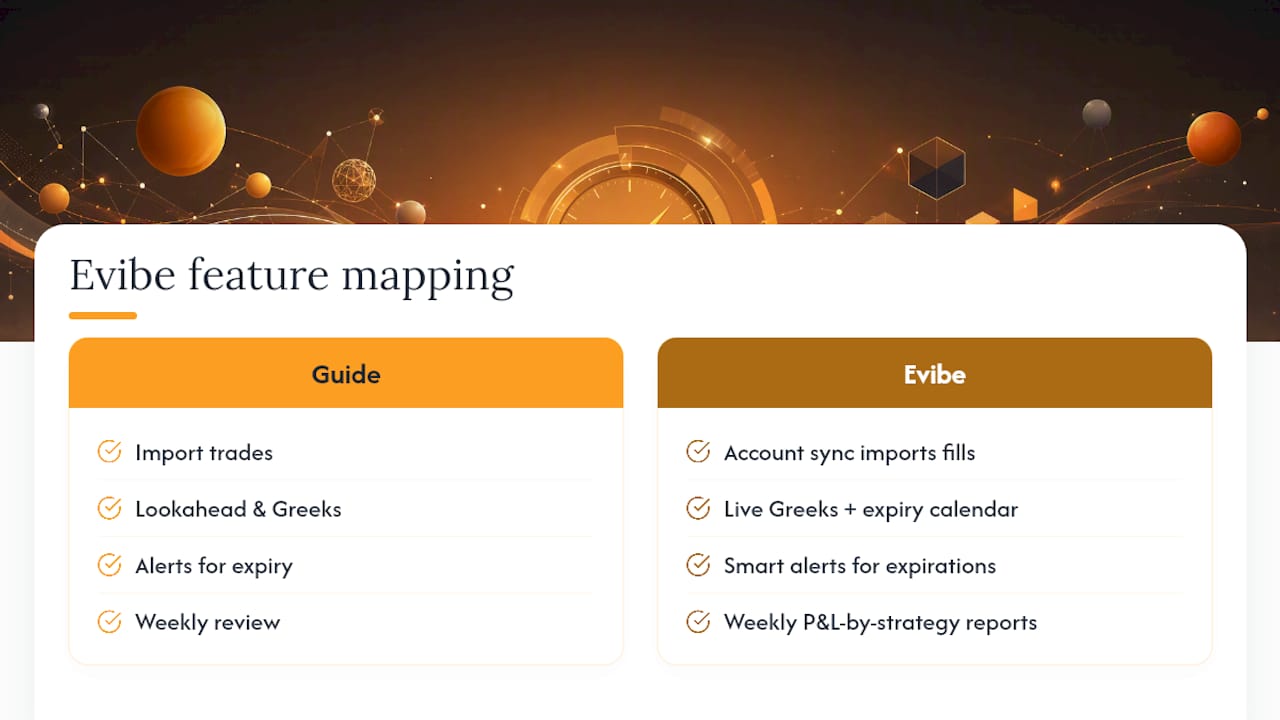
Every step in this guide, from import to weekly review, is a feature in Evibe's options tracker, not a separate task you have to bolt on yourself. Account sync pulls your broker fills into canonical trade rows automatically. Live Greeks and an expiry calendar replace the manual lookahead you'd otherwise build in a spreadsheet. Smart alerts flag approaching expirations and assignment risk before they become a Monday morning surprise, and weekly reports give you the P&L-by-strategy breakdown this article recommends building by hand.
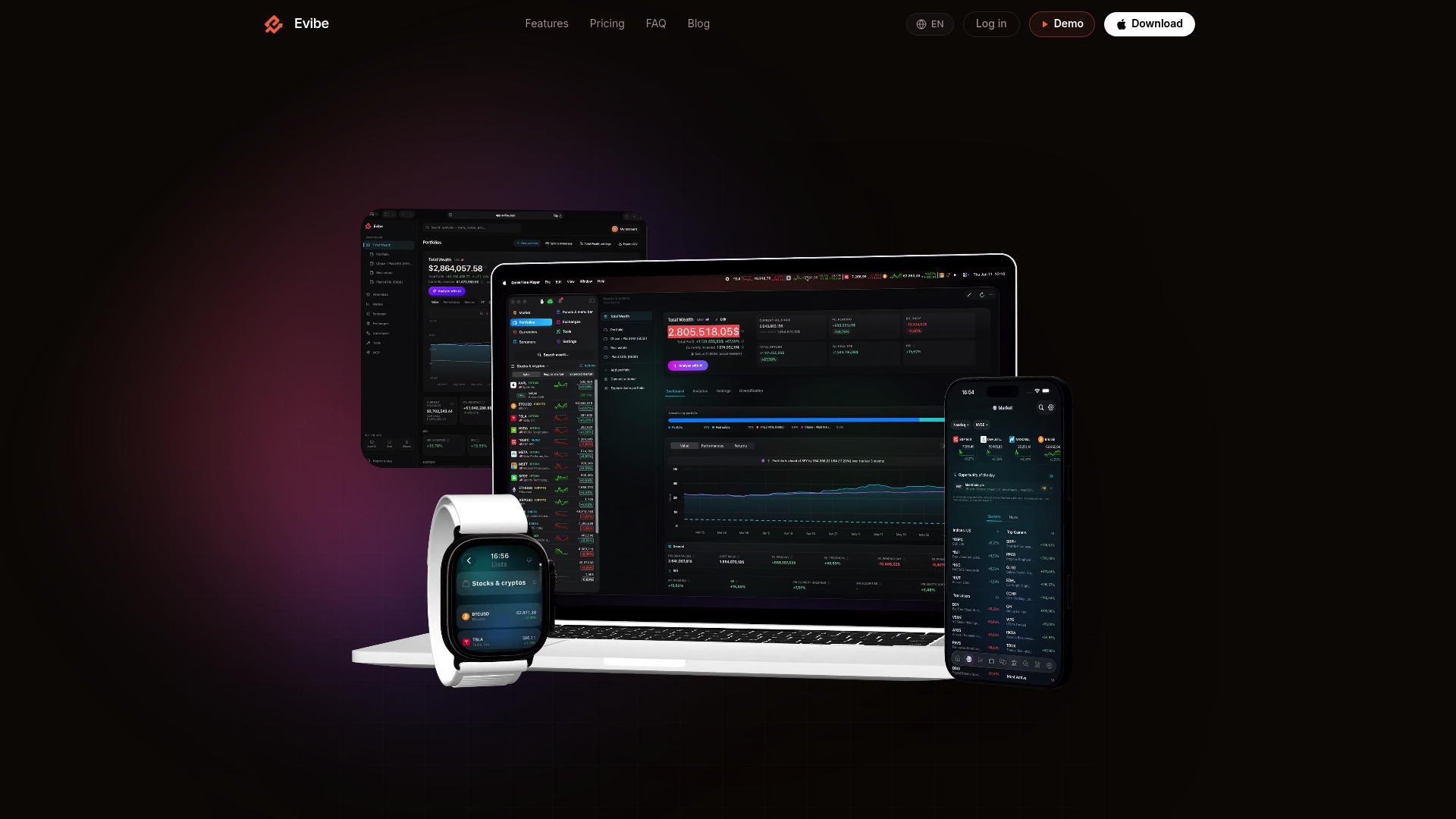
If you're running options alongside stocks, ETFs, or dividend income, Evibe consolidates all of it into one portfolio view instead of forcing you to reconcile four different apps. Traders using ETF-based options strategies get the same treatment through the ETF tracking tools, and dividend-focused traders managing covered calls can cross-reference ex-dividend timing against assignment risk in the same dashboard.
Try it the practical way: enable a broker import, run a 7-day lookahead on your current book, and compare the reconciled P&L against your broker statement. If the numbers match and the alerts catch something you'd have missed, you've found your tracker. Evibe is free to use, and every new account starts with 7 days of Premium through the App Store — broker sync included, no card required.
Sources
Three sources back the framework in this guide. TraderSync's journal field checklist covers the minimum data points any tracker needs. Days to Expiry's assignment tracking guide breaks down moneyness-based assignment probability and capital planning. For a look at how mobile trackers structure imports and alerts, the AllInvestView App Store listing shows the category in practice. If you also track cross-asset market swings, strategies for monitoring currency fluctuations offer a useful parallel framework.
This article is general information, not a substitute for advice from a qualified financial advisor. Consult a qualified financial professional about your own circumstances before acting on anything here.
- What to Track in an Option Trading Journal - TraderSync
- Options Assignment Tracking: A Complete Guide | Days to Expiry
FAQ
How Can I Track My Options Trades?
Record every trade as a row with strike, expiry, contracts, entry and exit price, and P&L, then use a spreadsheet for small books or a dedicated app like Evibe once you're managing more than 10 to 15 open positions across strategies.
What Are the Four Types of Options?
The four basic positions are long call, short call, long put, and short put. Every multi-leg strategy, from credit spreads to iron condors, is built by combining these four in different strikes and expirations.
Do I Need $25,000 to Trade Options?
No, the minimum balance rules apply specifically to pattern day trading in margin accounts, not to options trading itself. Most brokers let you trade options with smaller balances, though buying power and strategy approval levels still apply.
What Is an Options Trader's Salary?
There's no standard salary for options trading since most retail traders manage personal capital rather than draw a wage, and returns vary enormously based on strategy, position sizing, and market conditions. Professional traders at firms typically earn a base salary plus performance-based compensation, which differs significantly from independent retail trading income.